You can manage customer data efficiently in Retail Express through bulk import and export capabilities, helping your retail operations handle large-scale customer database updates quickly. This capability enables mass customer data operations that would be time-prohibitive through individual record management, which helps maintain current customer information and supports marketing and CRM initiatives.
Setting up bulk customer data workflows enables your retail operations to maintain comprehensive customer databases efficiently, helping optimize customer data management and relationship building. This helps retail businesses keep customer information current while enabling efficient data operations that support targeted marketing and improved customer service across all locations.
Announcing the new Customer Mass Download/UploadWe're excited to announce the new Customer Mass Download and Upload tools - a new, efficient way of managing your customer details in bulk.
Features at a glance:
- Support for larger datasets - more than a million records
- Navigate away from the page while the download or upload is being processed - come back and check the progress bar to see the status
- More fields in the Customer Download, including survey segments!
- Additional filters on the Mass Download so you can target the customers you need e.g. select only customers enabled for loyalty, or account customers
- No more copy & paste for new customer imports - you can now map your data to Retail Express fields
- New on-screen validation and error handling to save time and resolve errors easily
- Detect duplicate emails or mobile number before uploading your data
Support for Large Datasets
To support larger datasets we've made two substantial changes:
- New CSV file format instead of the former Excel templates, allowing for efficient processing of over a million records
- Uploads and Downloads are now processed in the background - you can navigate away from the page and come back, with a handy Progress Bar showing the status
Please note, as part of the move to CSV you'll find that for some fields we include an apostrophe (') in the download (and recommend doing the same when uploading data into Retail Express). This is to avoid some programs, like Microsoft Excel, from formatting the data incorrectly e.g. removing leading zeroes, truncating the data or even changing to scientific notation. We've listed all of these fields in the Customer Mass Upload Field Requirements article.

New Filters
We've introduced a new Filtering system to the Mass Download, plus added additional filters. It's now even easier to target only the customers you need.

For example, if you need to target your Loyalty customers, the Loyalty filters will let you export only the customers in your Loyalty Programs (or even those who aren't).
New Fields
We've also modified the fields that are available in the Mass Download to make the Mass Download file more useful than ever:
- Added:
- Delivery Mobile
- Loyalty Points To Date
- Loyalty Points Redeemed
- Loyalty Points Dollar Value
- Loyalty Auto Price Group
- Account Customer Credit Remaining
- Survey Segments (Questions and Answers)
- Removed:
Column Availability and Customisation
All fields available in the Customer CSV export template are now supported as columns within the grid. The grid loads with the current (existing) columns as the default view. Users can customise the grid by enabling additional columns as needed or reverting back to the default layout using the reset option.
Columns can be reordered using drag and drop, allowing users to arrange data in a way that best suits their workflow. Column order and visibility preferences are retained in the browser cache and automatically restored on the next page load.

Column Grouping
Customer fields in the Mass Download grid are organised into logical column groups to make it easier to find, enable, and manage related data. These groups are displayed within the Column Picker, where users can expand or collapse each section and select the columns they want to view.

The available column groups include:
- Codes and SKUs
Customer identifiers and reference codes used across the system and integrations. - Descriptions
Customer names and descriptive fields used for identification and display. - Attributes
Core customer attributes and profile-related fields. - Pricing
Price group assignments and pricing-related customer settings. - Supplier and Purchasing
Purchasing-related fields associated with the customer record. - Dimensions
Dimensional or measurement-based fields where applicable. - Other Settings
Miscellaneous configuration fields not covered by other groups. - Custom Properties & URLs
Custom fields and external URL values configured against customer records. - Sales Channels
Fields related to channel visibility and publishing (for example, web or platform-specific settings).
Users can quickly Select All, Clear All, or Reset columns using the controls at the top of the Column Picker.
The Reset option restores the default column set shown when the page first loads.
Column visibility and order are retained in the browser cache and automatically restored on the next page load.
Header Row Filtering
A header row filter allows users to filter customer records directly within the grid. Filters can be applied to any visible column and combined across multiple columns. Filtering is session-based and is not retained when the page is refreshed.
Export Options
The footer actions have been updated to provide more control over exports:

- Export All Columns – Exports all available customer fields, regardless of column visibility
- Export Visible Columns – Exports only the columns currently displayed in the grid
The exported file respects the current column order shown in the grid.
Sorting and Persistence
Column sorting continues to behave as before. Column visibility, order, and sorting preferences are retained per browser session, while applied filters are not saved.
Customer Upload Field Mapping
Say goodbye to copy & paste when importing data from other systems - you can now map Retail Express fields to the data in your file when creating new customer records.
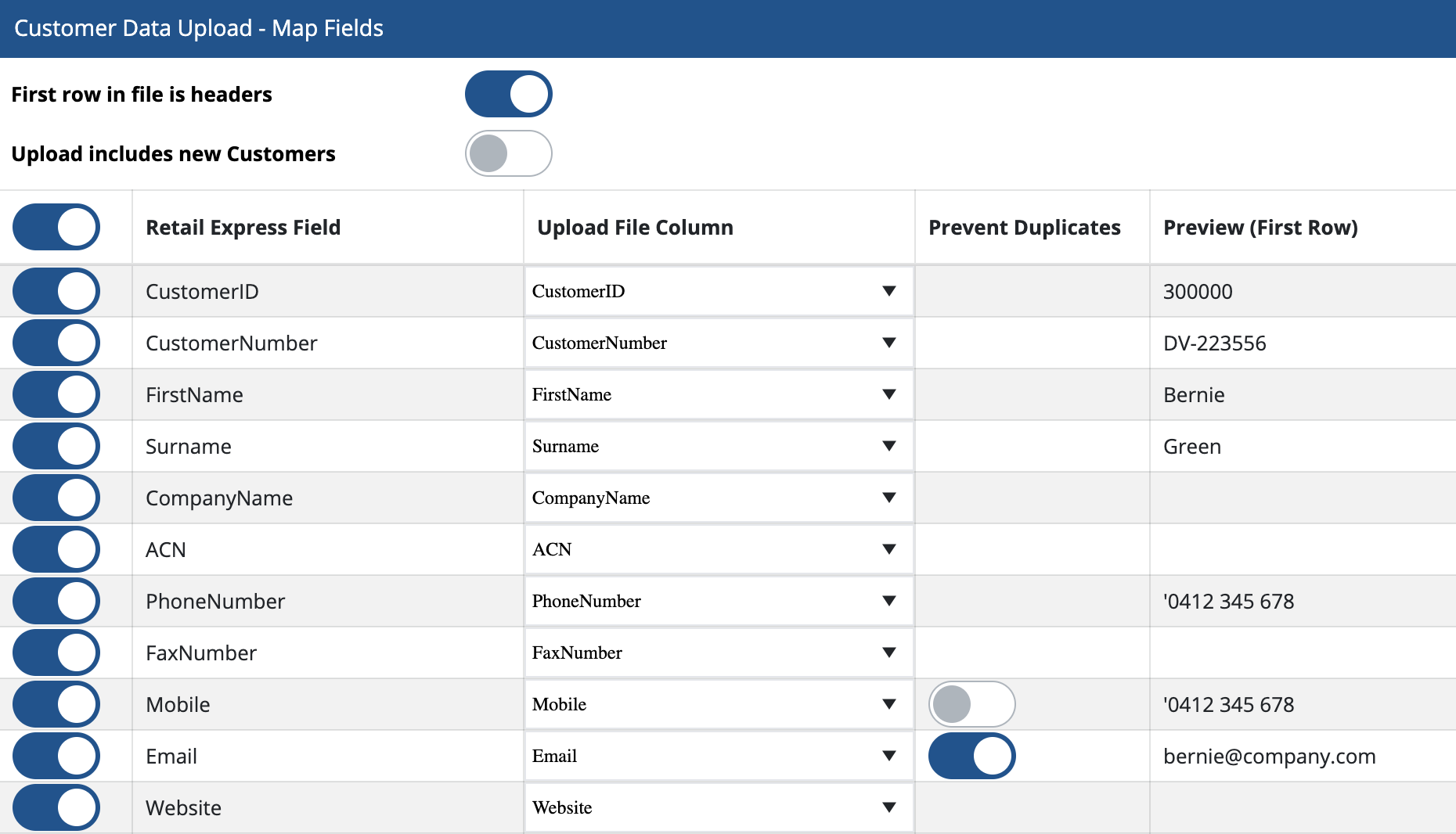
Simply toggle on the Retail Express fields you want to update, select your fields from the drop-down, check the preview on the right-hand side, enable duplication check for Mobile and Email (if required) and upload your file!
For a full list of Retail Express fields, including their character limits, take a look at the Field Requirements guide.
Validation and Duplication Handling
We've simplified the process of resolving errors with your data uploads with on-screen validation and duplication detection.
 Duplicate detection for Mobile and Email
When uploading your data you'll be able to toggle on/off the Prevent Duplicates option for Mobile and Email. If enabled, as part of the on-screen validation you'll be warned about any duplicates that exist either in the database or the spreadsheet. You'll have the option of clearing the data from the upload or keeping your preferred customer record.
You can restrict duplicate emails in POS by disabling the "Allow Duplicates" option in Customer Settings. To provide feedback on further POS duplication requirements click here to visit our Product Portal.
The new on-screen validation makes it easy to resolve errors immediately, instead of having to edit your upload file and retry.

Depending on the error, you'll be able to:
- Click and edit values
- Select from existing values in a drop-down
- Select which duplicate to retain
- Click "clear data" to ignore the data in the upload
Accessing the new Mass Download and Upload tools
You can find the new Mass Download and Mass Upload tools under the Customers menu (formerly "CRM") and "Customer Management".

The historical Customer Mass Download and Upload tools have been renamed to "Legacy".
Click below to get started with detailed step-by-step instructions:
- Customer Mass Download
- Customer Mass Upload
These new tools will be available alongside the historical Mass Download and Upload (now renamed "Legacy") so you can continue to use the tools you're familiar with while you get used to using the new ones. We'll be sure to give you plenty of notice before the Legacy Customer Mass Download and Upload are removed.