In this release, we have added some new enhancements to our Neto Control Panel sections.
Enhancement: Invite Users via Maropost Identity
Neto admins can now send invites to new and existing staff members to access their Neto Control Panel accounts via Maropost Identity. Staff members will receive invite emails from their admins asking them to create a new Maropost Identity account if they haven’t had one previously. Else, they can link their current Maropost Identity account with their Neto Control Panel account.
Once the accounts get linked, the staff users' identity status gets updated in the Staff User section.

To understand how to invite staff users and get their Neto accounts linked, read our Invite Users to Neto Control Panel article.
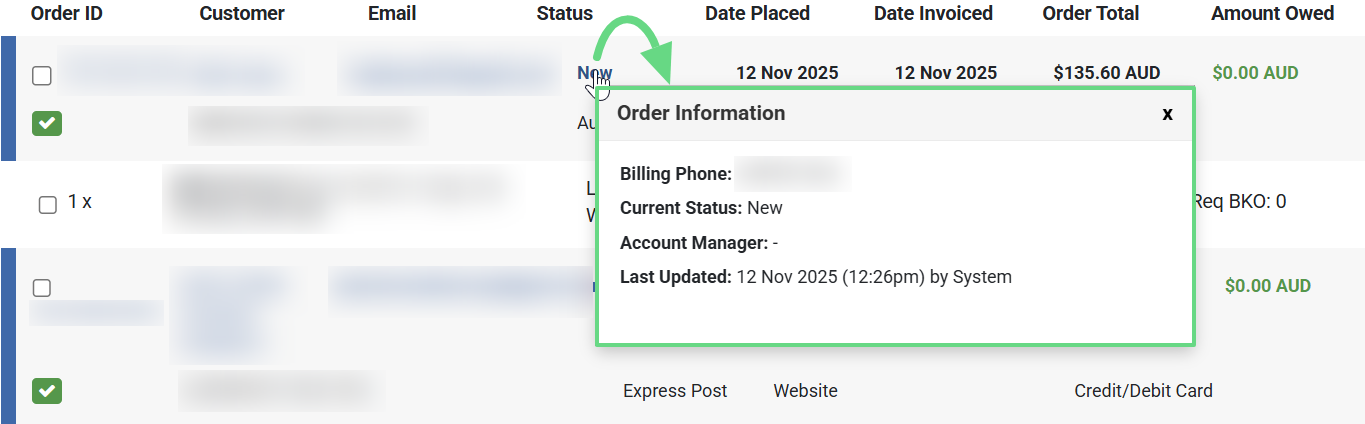
Enhancement: Order Information Pop-up
You can now view key metrics of your order by hovering over its order status. Upon doing so, an order information pop-up appears, displaying details such as its billing report, current status, order update records, status history, and more.
This feature is available on the "Legacy" order list page and can be dismissed by clicking outside the pop-up. The hover-to-reveal design guarantees the pop-up appears only by choice, not by accident, delivering a seamless, non-intrusive user experience.